Scheduling Strategy
Connecteam vs. When I Work: Which Is Better For Your Team?

| • Pick When I Work if your team works in shifts and mostly needs a better schedule. Connecteam suits deskless teams that also want HR and training tools in the same app. • Connecteam’s Small Business Plan is free for up to 10 users, and paid hubs start at $35/month for the first 30 users (monthly plan). For 11-30 users, teams can still use a free plan through their limited plan options. • When I Work costs $2.50 per user per month for a single location or $5 per user per month for multiple locations, after a 14-day free trial. • Connecteam can track an employee’s live location during a shift. When I Work checks GPS only at clock-in and clock-out. • Every When I Work plan bundles scheduling, time tracking, and team messaging, while Connecteam bills its full chat tools as a separate Communications Hub. |
Connecteam and When I Work both help managers run hourly, front-line teams. Connecteam is an all-in-one app for running a deskless workforce. When I Work focuses on scheduling for shift-based teams, like restaurants and retail stores.
For very small teams, Connecteam’s free plan can be an attractive entry point. But for managers who mainly need clean scheduling, labor visibility, and accountability without tackling layered modules, the choice comes down to whether you value focused scheduling simplicity or a broader set of workforce management features.
More than 200,000 workplaces run their schedules on When I Work, and Capterra named our platform on its 2026 Shortlist for employee scheduling.
Connecteam vs. When I Work, compared
Connecteam is an all-in-one platform for deskless teams. When I Work is a focused scheduling tool for shift-based teams that need to manage coverage and labor without a layered system.
| Connecteam | When I Work | |
| Best for | Deskless and field teams that want scheduling, HR, training, and chat in one app | Shift-based teams that want fast scheduling and team chat in one plan |
| Who it’s not for | Teams that only need scheduling and don’t want to manage several hubs | Teams that need a built-in training library or HR document hub |
| Industry focus | Field service, construction, delivery, security, and other deskless teams that move between job sites | Restaurants, retail, healthcare, hospitality, and other hourly, shift-based teams |
| Reviews | 4.6/5 on G2 4.6/5 on Capterra | 4.4/5 on G2 4.5/5 on Capterra |
Features
| Connecteam | When I Work | |
| Shift scheduling | Drag-and-drop scheduler and open shifts on every plan; templates and recurring shifts on Advanced; auto-assign on Expert | Drag-and-drop scheduler, templates, multi-week scheduling, and Auto Scheduling |
| Time clock and attendance | Mobile time clock, timesheets, breaks, and overtime in the Operations Hub | Mobile, web, and terminal clock-in with timesheets |
| GPS and geofencing | GPS clock-in plus live “breadcrumb” tracking during shifts, with up to 10 geofence sites on Advanced, unlimited on Expert | Checks GPS location at clock-in and clock-out |
| Shift swaps and availability | Open shifts employees can claim; more scheduling controls on higher tiers | OpenShifts, shift swapping, availability, and time-off requests |
| Team messaging | Full chat, updates feed, and surveys in the Communications Hub; paid Operations plans include limited chat access | 1:1 chat, group chat, and announcements included |
| Task management | Tasks, checklists, and forms in the Operations Hub | Shift and team task lists |
| Employee training and onboarding | Courses, quizzes, and onboarding in the HR & Skills Hub | No built-in course library; employee invites plus a Help Center with training resources |
| Plans and pricing | Free for up to 10 users; paid hubs start at $35/month for the first 30 users (monthly billing) For 11-30 users, teams can still use a free plan through their limited plan options | $2.50/user/month (single location) or $5/user/month (multiple locations); 14-day free trial |
Plans and pricing
Connecteam pricing
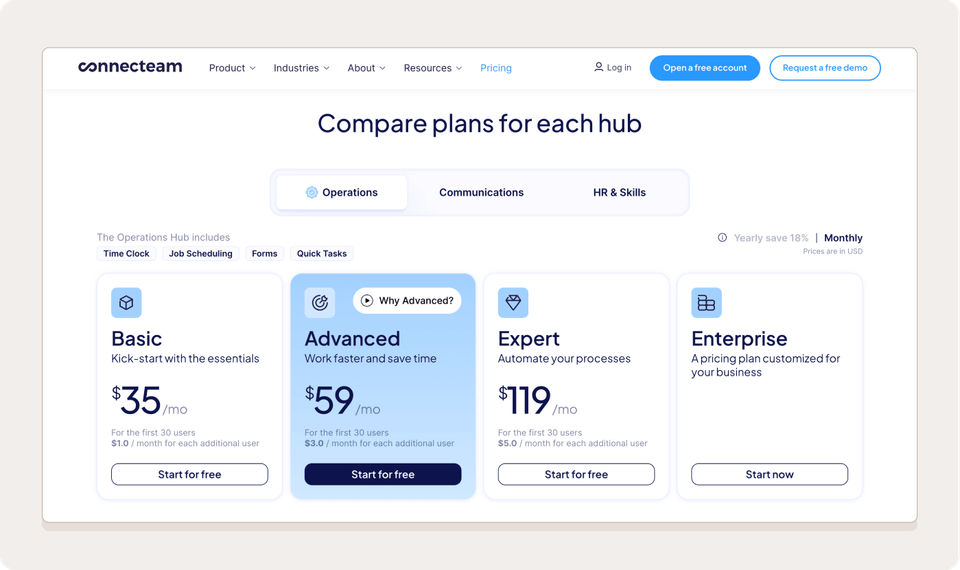
Connecteam sells three hubs: Operations, Communications, and HR & Skills. Each hub has Basic, Advanced, and Expert plans that cover your first 30 users for a flat monthly fee, plus a per-user fee for each user after that. On the monthly plan, each hub costs $35/month on Basic, $59/month on Advanced, and $119/month on Expert. Annual billing lowers those rates.
Teams of up to 10 users can use the free Small Business Plan. Teams of up to 30 can switch to a free Limited plan with fewer features after the 14-day trial.
When I Work pricing
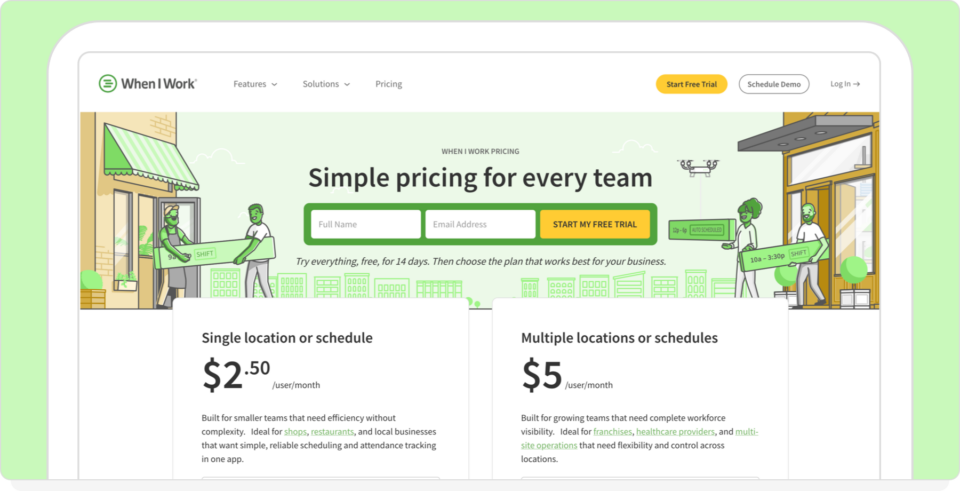
When I Work has two plans, both priced per user, per month: Single location or schedule at $2.50, and Multiple locations or schedules at $5. Every plan includes employee scheduling, time tracking and attendance, and team messaging, so you don’t need an add-on to get a time clock. The multi-location plan adds labor sharing between locations, custom reporting, role permissions, and time zone management.
Choose month-to-month or annual billing, with no contract. You can switch plans or cancel anytime, and larger organizations can request custom enterprise pricing.
Which plan costs less?
Connecteam can cost less for teams that only need one hub on the Basic plan. Costs climb as you add hubs or move up a tier, because features like auto-assigning shifts sit on the Expert plan. When I Work includes Auto Scheduling on every plan, and your bill only grows with your headcount.
Here’s what a 20-person, single-location team would pay each month on monthly billing:
| Pricing detail | Connecteam | When I Work |
| Entry-level paid plan | Basic: $35/month per hub for the first 30 users (monthly plan) | Single location or schedule: $2.50/user/month |
| Next tier | Advanced: $59/month per hub for the first 30 users (monthly plan) | Multiple locations or schedules: $5/user/month |
| Higher tier | Expert: $119/month per hub (monthly plan); Enterprise pricing by quote | Custom enterprise pricing on request |
| Users past 30 | $1–$5/user/month on the Operations Hub; $0.60–$3.60/user/month on the Communications and HR & Skills Hubs (monthly plan) | Same per-user rate at any team size |
| Free option | Small Business Plan free for up to 10 users; Limited plan free for up to 30 users; 14-day free trial | 14-day free trial, no credit card required |
Employee scheduling
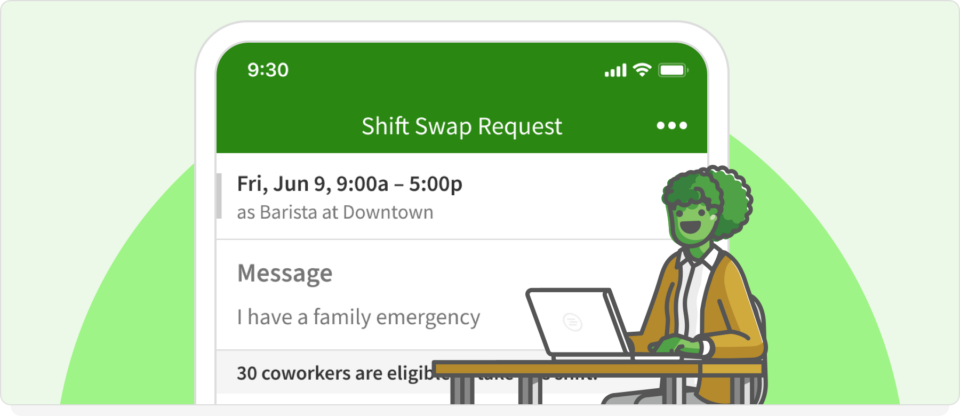
Schedule changes often happen with little notice. One way to compare platforms is to look at how each handles a same-day absence.
It’s 4 p.m. on a Friday, and a team member calls out sick. Each platform handles that call-out a little differently.
Connecteam scheduling
Connecteam’s Operations Hub has drag-and-drop scheduling, templates, recurring shifts, and auto-assignment tools. Managers can check availability, apply rules, and assign open shifts directly in the scheduling module.
Your Operations plan tier determines which overtime and shift controls you have access to. Paid Operations plans include limited chat for messaging employees about the shift, but group updates and surveys need a Communications Hub subscription.
When I Work scheduling
When I Work provides drag-and-drop scheduling, recurring shifts, and rule-based auto-scheduling within the same platform used for team messaging. Managers can define availability, qualifications, and labor limits in advance. When a shift opens, the app finds and notifies eligible employees without switching modules.
Scheduling, time tracking, and messaging operate within the same plan structure. Every plan includes advanced scheduling tools like custom scheduling rules, and the multi-location plan adds role permissions and labor sharing across locations.
The When I Work vs Connecteam difference in approach
Each platform offers scheduling and chat. They just package them differently:
- Connecteam sells scheduling and its full chat tools as separate hubs
- When I Work keeps scheduling and shift communication within the same core plan
With When I Work, 61% of shifts are covered or confirmed within 24 hours. Fast coverage means less time you have to spend on the schedule itself.
| “I have been able to take my employee scheduling from 8 hours a week to merely 15 minutes a week.” — Donna Rea, Caring Transitions |
Team messaging and communication
Connecteam messaging
Connecteam’s chat tools live in its Communications Hub. You get one-on-one and group chat, company update feeds, surveys, and an employee directory.
This works well if your team needs an internal news feed, but the Communications Hub is billed separately from scheduling. Paid Operations plans include limited chat access, while the full feed, surveys, and directory need a Communications Hub subscription.
When I Work messaging
WorkChat is the team messaging tool that’s built into every When I Work plan. You can send one-on-one messages or group chats, and post an announcement to your team without sharing personal phone numbers.
Messages sit right next to the schedule, so a shift change and the chat about it live in one place. Each week, 85% of When I Work employees and employers engage with the app.
Learn how WorkChat keeps your team connected, or get more tips for communication with team members.
Attendance verification
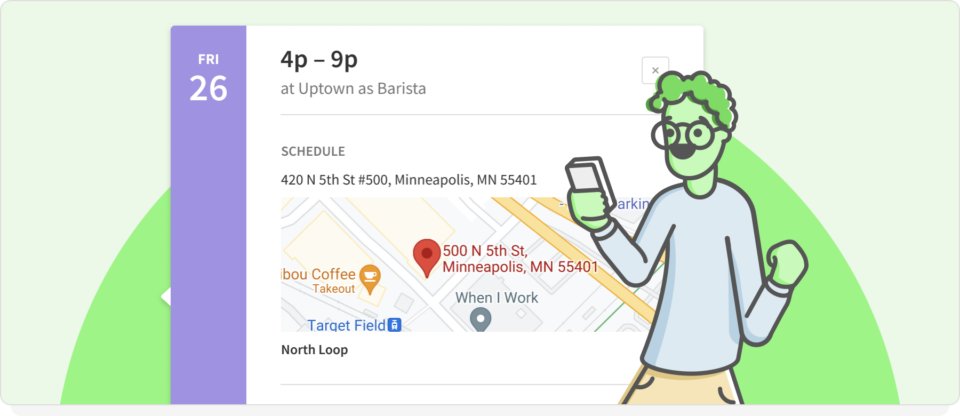
Connecteam verifies clock-ins with GPS and geofencing, and When I Work adds photo clock-in to confirm who’s starting the shift.
Connecteam attendance verification
Connecteam’s time clock records GPS location at clock-in and can limit clock-ins to geofenced job sites. Teams can also set up a Kiosk Station so several employees clock in from one shared device.
When I Work attendance verification
When I Work includes GPS-based clock-in verification and photo clock-in functionality. Photo verification requires employees to take a selfie at the time of clock-in, helping confirm that the correct person is starting the shift. That accountability shows up in attendance as well. Teams using the platform report a 3X reduction in employee no-shows.
Shift-based workplaces usually use this method when confirming identity at clock-in matters. A clear attendance policy helps set those expectations from day one.
Location tracking and geofencing
Location tools help you confirm employees are at the job site when they clock in. The two apps differ in how much location data they collect once the shift starts.
Connecteam location tracking
Connecteam has three location tools: GPS stamps at clock-in, geofencing, and Breadcrumbs live tracking. Breadcrumbs records your employee’s locations while they’re clocked in and on the move, letting managers track their route during work.
For it to work, employees must set the app’s location access to “Always.” The platform says it only shares locations with managers while the employee is on the clock. Geofenced job sites depend on the plan, with up to 10 on Advanced and unlimited on Expert.
When I Work location tracking
When I Work has a different approach. When location restrictions are on, the app checks an employee’s GPS location only when they clock in or out. Nothing gets tracked during the shift. Set a clock-in radius around the job site, and employees can clock in once they’re inside it.
For most restaurants and clinics, that’s all the proof you need, without the privacy concerns of live tracking.
Setup, onboarding, and time to value
When I Work has fewer settings to configure and Connecteam’s setup time depends on how many hubs you enable.
Connecteam setup
Connecteam’s help center includes starting guides for features like the time clock and job scheduler, and Enterprise plans add a personal success manager. How long setup takes depends on which hubs you turn on, like Operations, Communications, and HR & Skills, or all three.
For teams using scheduling only, setup is quick. For teams enabling scheduling alongside training, forms, and communication, you’ll configure settings across multiple areas of the platform.
This structure supports teams that want broader workforce tools in one system.
When I Work setup
When I Work centers on scheduling, time tracking, and team messaging. With a narrower feature scope, many teams configure scheduling settings and begin publishing shifts without worrying about separate product categories.
Managers typically define:
- Employee availability (which employees can also configure)
- Roles and positions
- Scheduling rules
- Overtime settings
Once those are defined, teams can begin generating schedules and tracking attendance.
| “Setup literally took minutes and the interface was extremely intuitive.” — Jay Miller, Comfort Dental |
Which platform is faster to set up?
Neither platform is inherently faster. The timeline depends on the number of features you plan to activate and the complexity of your workforce policies.
When I Work vs Connecteam support comparison
Both platforms offer live chat and a help center, but Connecteam adds 24/7 chat and email.
| Support option | Connecteam | When I Work |
| Live chat | 24/7 live chat | Live chat with a less-than-30-second response time |
| Phone support | Phone support options | Not listed |
| Self-serve help | Help center, knowledge base, and community forums | Online help center and training resources |
| Tickets and in-app help | Not listed | Ticket-based support and in-app support options |
| Plan availability | May vary by plan tier | Help center and live chat |
For teams that mainly need help with scheduling setup and payroll integration, these resources should cover most of your questions.
Payroll integrations and ecosystem fit
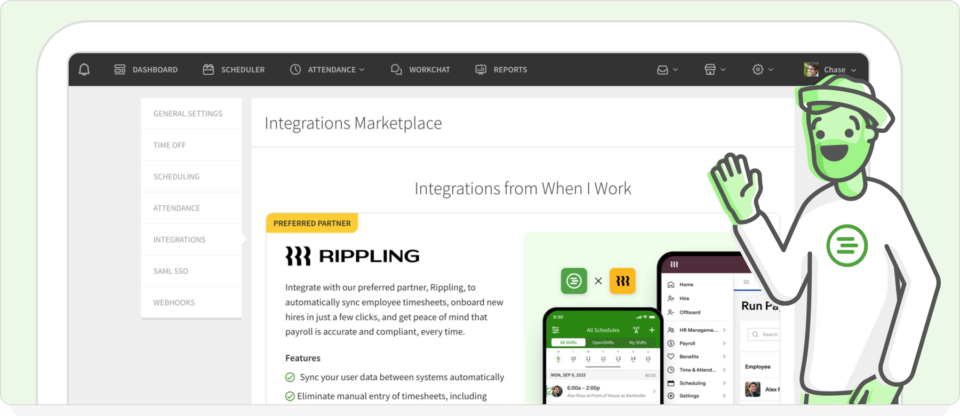
Payroll integration is a key consideration in any Connecteam vs When I Work comparison, especially for teams looking to improve workflows.
When I Work payroll integrations
When I Work integrates with multiple payroll providers, including:
- Rippling (preferred partner)
- QuickBooks
- Gusto
- Other supported systems
Rippling is the preferred payroll partner because When I Work syncs directly into Rippling payroll. For teams using QuickBooks, Gusto, or other providers, When I Work also supports payroll integrations designed to reduce manual entry between systems.
That means you can keep your current payroll provider. For more ways to cut payroll errors, see these payroll best practices.
Connecteam payroll integrations
Connecteam integrates with QuickBooks Online, Gusto, Xero (Australia and UK), Paychex Flex, and MYOB Business, and offers export templates for QuickBooks Desktop. Payroll integration is included starting with the Basic Operations plan.
Like When I Work, Connecteam supports payroll exports and partner integrations to help teams transfer approved timesheets into payroll systems.
Which payroll setup fits your team?
If you already use Rippling, When I Work is simpler because both sync together. For companies using other payroll providers, compare each tool’s integrations against your payroll and HR systems.
Security, compliance, and data handling
Both platforms are SOC 2 Type II certified and support GDPR and multi-factor authentication. Below is a high-level overview based on publicly available documentation as of November 2026.
| Category | Connecteam | When I Work |
| Data encryption | AES-256 encryption | Data stored and transmitted securely; TLS enforced |
| SOC 2 | SOC 2 Type II | SOC 2 Type II |
| ISO 27001 | ISO/IEC 27001 certified | Not listed |
| GDPR | Yes | Supports GDPR and CCPA requests |
| Multi-factor authentication | Yes (admin 2FA on Enterprise plan) | Yes |
| Hosting | Multiple regions | AWS, with primary data centers in the U.S. |
HIPAA considerations
When I Work is designed for staff scheduling, attendance tracking, and team messaging. It’s not intended to store Protected Health Information or function as a clinical record system.
Connecteam says that it supports HIPAA compliance when it’s set up a certain way. If your team handles PHI, then they should review vendor documentation before you choose.
Which is better: Connecteam vs. When I Work?
When comparing Connecteam vs. When I Work, Connecteam is better for teams that want an all-in-one HR and operations app, but When I Work is ideal for teams that need core functionality like fast scheduling and time tracking.
Both platforms support shift-based teams with scheduling, time tracking, and messaging. The difference is how broad you want your workforce system to be.
Choose Connecteam if:
- You prefer a modular system organized into separate product areas
- You value a free plan for very small teams
- You want a single platform that includes broader employee management features
Choose When I Work if:
- Your focus is on shift scheduling, attendance tracking, and labor visibility
- You want scheduling and messaging connected within the same workflow
- You prefer a per-user pricing structure rather than separate product categories
- You’re looking for a Connecteam alternative centered on scheduling clarity
The strength of When I Work is focus and ease of use to save you time. Managers find it easy to use, and employees like it too. The app has a 4.8/5 rating based on more than 53,000 App Store ratings.
Reclaim your Sunday nights with rule-based scheduling
When I Work was built to eliminate the burden of Sunday night scheduling admin. Switch from manual drag-and-drop scheduling to rule-based auto-scheduling, and you can get up to 15 hours of your life back every week.
- Instantly fill shifts. Stop the endless “can you work?” text chains. Post an open shift and let your qualified, available staff claim it in seconds.
- Protect the budget. See your labor costs and overtime risks before you publish. You’ll get an alert the moment a schedule threatens your margins. That early warning is part of how some When I Work customers see a 20% cut in labor costs.
Frequently asked questions
What is the best app to track time at work?
The best time tracking app depends on whether you have a shift-based or a field team. When I Work is good for shift-based scheduling because the time clock ties directly to your employees’ schedules, allowing you to compare scheduled and actual hours. Connecteam is well-suited for field teams that need live GPS tracking during shifts.
Can your employer see your location on Connecteam?
Yes, but they can only see your location while you’re clocked in. If your employer turns on the platform’s Breadcrumbs feature, they can see your live location during your shift. Your location isn’t shared when you’re off the clock, though.
Does When I Work offer a free plan like Connecteam?
Connecteam offers a free plan for teams with up to ten users, while When I Work is a paid platform that costs $2.50/user/month for a single location or $5/user/month for multiple locations, with a 14-day free trial. When I Work eliminates the feature gates common to free tiers and makes rule-based auto-scheduling and advanced labor forecasting core pillars of the platform.
Why are managers switching to When I Work as a Connecteam alternative?
Many managers choose When I Work because it takes less setup. Connecteam sells its tools as three hubs (Operations, Communications, and HR & Skills), each with its own plan tiers, so teams using more than one hub work across separate product areas. When I Work focuses on scheduling, time tracking, and team messaging in one plan, so managers set up availability, roles, and scheduling rules, then start publishing shifts.
What is the Rippling six-month free offer?
Since Rippling is a When I Work preferred partner, eligible new customers get six free months of Rippling payroll, HR, and IT services. Get a native payroll that can sync scheduled hours and approved timesheets into payroll.